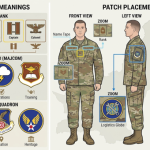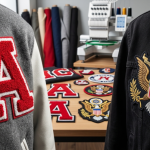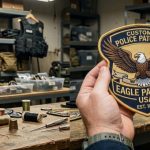
A few years ago, turning an idea into a wearable patch meant sketching it by hand or hiring a graphic designer before a manufacturer ever touched it. Today, anyone can open an AI image generator, describe a concept in a sentence, and see a patch-style design appear in seconds. This shift has made it possible to design custom patches using AI at almost every stage of the creative process, from a rough concept for a motorcycle club to a polished mockup for a corporate uniform program.
This guide walks through what AI patch design actually is, how it works, which tools are worth trying, and where AI hands off to a real custom patch maker who can turn a digital concept into fabric, thread, and PVC. Along the way, it covers the prompts that work, the mistakes that waste time, and the production steps an AI tool cannot skip.
What Does It Mean to Design Custom Patches Using AI?
Designing a custom patch using AI means using a text-to-image or image-to-image generator to create a visual concept of a patch before it goes into production. The AI interprets a written prompt, or an uploaded logo or sketch, and outputs an image that mimics the look of an embroidered, woven, PVC, or chenille patch, complete with stitch texture, borders, and color separation.
It is important to separate two things that often get blurred together: an AI-generated concept image and a production-ready patch file. AI is excellent at the first part, rapid visual ideation, and largely unnecessary for the second part, which still depends on vector artwork and stitch-mapped digitizing files that a manufacturer can actually run on embroidery machines or PVC molds.
Why Are Brands and Individuals Turning to AI for Patch Design?
AI patch design has grown in popularity because it removes the two biggest barriers to getting started: design skill and cost of early concepting. A small business owner, a scout troop leader, or a motorcycle club member can now explore dozens of visual directions before committing to a single design.
- Speed: a usable concept appears in seconds instead of days of back-and-forth with a designer.
- No design software required: prompts replace vector tools like Illustrator for the early idea stage.
- Unlimited iteration: colors, layouts, and themes can be regenerated at no extra cost until something feels right.
- Lower barrier for first-time buyers: people ordering their very first patch can visualize an idea before reaching out for a quote.
- Better creative briefs: a generated image gives a professional patch maker a clear starting point instead of a vague description.
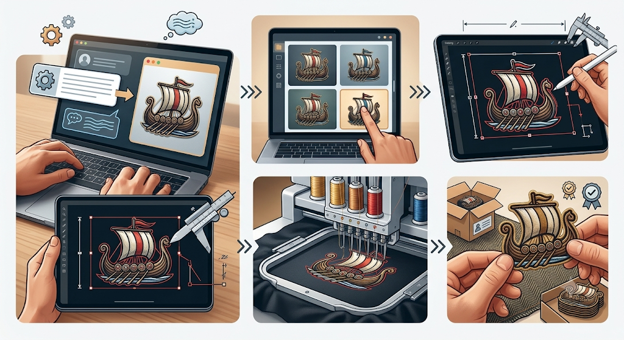
How Does AI Patch Design Actually Work? (Step by Step)
Step 1: Define the Purpose of the Patch
Before writing a single prompt, decide who the patch is for and where it will be worn. A patch for a corporate uniform behaves differently in tone, color, and complexity than a patch for a motorcycle vest or a scouting program.
Step 2: Choose a Text-to-Image or Image-to-Image Generator
General-purpose AI image generators and dedicated patch generators both work, though they behave differently. Text-to-image tools build a design from a written description, while image-to-image tools take an existing logo or sketch and restyle it into a patch-like appearance.
Step 3: Write a Structured Prompt
The most reliable AI patch design results come from prompts that specify shape, subject, color palette, border style, and any text, rather than a single vague sentence. The prompt formula in the next section breaks this down.
Step 4: Generate Multiple Variations and Compare
Because AI output is inconsistent by nature, generating three to five variations of the same prompt, then adjusting the wording based on what worked, produces far better results than accepting the first output.
Step 5: Simplify the Design for Real-World Production
AI tends to favor fine detail, gradients, and photorealistic shading, none of which survive well once translated into thread or vinyl. Simplifying colors and line weight at this stage saves time later during embroidery digitizing.
Step 6: Hand the Concept to a Professional Patch Maker
The AI-generated image becomes a creative reference, not a finished product. A patch maker uses it to build clean vector artwork and a stitch-ready file, you should know 15 expert patch design tips before anything goes into production.
Best AI Tools for Designing Custom Patches in 2026
| Tool Category | Best For | Input Needed | Output Type | Production-Ready? |
|---|---|---|---|---|
| General AI image generators | Broad creative exploration, mood and theme testing | Written prompt | Raster concept image | No, needs vectorizing |
| Patch-specific AI generators | Fast patch-style mockups with borders and stitch texture | Written prompt or short brief | Raster patch mockup | No, needs digitizing |
| Image-to-image converters | Restyling an existing logo into a patch look | Uploaded logo or photo | Restyled raster image | No, needs vectorizing |
| AI-assisted digitizing software | Converting finished artwork into stitch files | Vector or high-res artwork | Stitch file (DST, EMB) | Partially, review still needed |
The AI patch design space includes general-purpose image generators, patch-specific generators, and image-to-image converters that restyle an existing logo. None of these replace a manufacturer’s design and digitizing team, but they are useful for the concepting stage.
The comparison below groups tools by category rather than endorsing a single product, since the right starting point depends on whether a person already has a logo or is starting from a blank idea.
Once a direction feels right, the next practical step is converting that concept into clean vector artwork through a vector conversion service, which prepares the design for accurate color separation and embroidery mapping.
How to Write a Prompt for an AI-Generated Patch Design
A strong AI patch design prompt reads more like a manufacturing brief than a creative writing exercise. The most consistent results come from including six elements in a fixed order.
- Patch shape: circular, shield, oval, rectangular, or die-cut custom shape.
- Central subject: the main icon, mascot, letters, or emblem.
- Style or theme: military, varsity, tactical, vintage, cartoon, minimalist.
- Color palette: two to four named colors, since fewer colors translate better to thread or PVC.
- Border type: merrowed edge, heat-cut edge, or no border.
- Any text or motto: kept short, since long text rarely reads clearly once stitched.
Example Prompt Structure
“A circular embroidered patch featuring a howling wolf silhouette on a mountain ridge, tactical olive and black color palette, thick merrowed border, no additional text.”
“A shield-shaped patch for a youth soccer team, cartoon-style eagle holding a soccer ball, navy and gold colors, heat-cut border, team name ‘Ironhawks’ stitched below the emblem.”
AI-Generated Artwork vs Production-Ready Patch Artwork: What Is the Difference?
This is the single most misunderstood part of AI patch design. A generated image can look finished on screen while still being unusable for actual manufacturing. The table below breaks down where the two diverge.
| Factor | AI-Generated Concept Image | Production-Ready Patch Artwork |
|---|---|---|
| File type | Raster (PNG, JPG) | Vector (AI, EPS, SVG) or digitized stitch file |
| Color accuracy | Approximate, screen-based RGB | Matched to actual thread or PVC color charts |
| Line and text clarity | Often blurred or inconsistent under close inspection | Cleaned and simplified for stitch or mold accuracy |
| Scalability | Loses quality when resized | Scales cleanly to any patch size |
| Manufacturing readiness | Reference only | Ready for embroidery, PVC, or woven production |
Comparing an AI mockup against real production methods is similar to comparing it with DTF transfers vs custom patches, where the finished look on a screen or sample sheet does not always predict how a design performs once it is actually applied to fabric.
Common Mistakes When Designing Patches With AI
- Requesting extremely fine detail or photorealistic shading that cannot survive translation into embroidery thread.
- Sending the raw AI image straight to production instead of having it vectorized and digitized first.
- Ignoring how the design will scale at the intended patch size, which a proper sizing guide can help avoid.
- Using too many colors in a single prompt, which raises production complexity later.
- Choosing a patch material after the design is finished instead of designing with the material in mind from the start.
- Assuming every AI tool understands specialized terminology like merrowed borders or Velcro backing without being told explicitly.
Getting the dimensions right early avoids one of the most common regrets in patch ordering.
From AI Concept to Embroidery-Ready Patch: What Happens Next
Once an AI-generated design captures the right idea, a few production steps stand between the concept and a finished patch.
1. Vector Conversion
The raster image is redrawn as clean vector artwork through vector conversion, which removes noise, sharpens edges, and prepares the file for accurate color separation.
2. Embroidery Digitizing
For embroidered patches, the vector file is converted into a stitch file through embroidery digitizing, which maps stitch direction, density, and underlay so the design holds its shape on fabric.
3. Material Selection
The design is matched to a patch type based on style and use case, whether that is a classic embroidered patch, a weatherproof PVC patch, a plush chenille patch for varsity-style lettering, or a flat, fine-detail woven patch.
4. Digital and Physical Proofing
A digital proof confirms color placement and layout, and a physical sample is often recommended before a full production run, since thread, PVC, and chenille all render color and texture differently than a screen.
5. Pricing and Production Timeline
Cost depends on patch size, material, backing type, and quantity. Make sure to ask for a custom patch cost guide, and an instant estimate can be requested through the pricing page.
Choosing the Right Patch Type for Your AI-Generated Design
Different AI-generated styles translate better to certain patch materials. Matching the concept to the right material early prevents disappointment once the physical sample arrives.
| AI Design Style | Recommended Patch Type | Why It Works |
|---|---|---|
| Clean corporate logo, flat colors | Embroidered Patches | Classic textured finish, ideal for uniforms and branding |
| Bold outdoor, tactical, or automotive icon | PVC Patches | Weatherproof and durable for bags and gear |
| Varsity-style lettering or numbers | Chenille Patches | Thick, raised texture built for letterman jackets |
| Fine detail, gradients, or small text | Woven Patches | Flat, tightly woven finish that holds detail better |
| Vintage or premium branded look | Leather Patches | Structured, rugged finish that ages well on hats |
| Photo-style or highly detailed artwork | Sublimated Patches | Full-color printing captures gradients embroidery cannot |
For military, tactical, or morale-style AI concepts specifically, it is worth reviewing dedicated military patches and morale patches options, since backing type and durability requirements differ from everyday branding patches.
Tips to Get Better Results From AI Patch Design Tools
- Name specific colors instead of vague terms like “nice colors,” since exact color names produce more consistent output.
- Ask for a flat, front-facing mockup rather than an angled or 3D render, since flat views are easier to evaluate for stitch accuracy.
- Regenerate with small prompt changes rather than starting over completely, to track which wording produced better results.
- Test the design in grayscale to check contrast before finalizing a color direction.
- Keep any wording under a few words, since long phrases rarely stay legible once stitched at patch scale.
- Save two or three favorite variations rather than a single design, since a professional patch maker can often combine strong elements from multiple concepts.
Frequently Asked Questions
Can AI actually design a custom patch for me?
Yes, AI tools can generate a visual concept of a patch based on a written prompt or an uploaded logo. The result is useful for exploring ideas, colors, and layout, though it typically needs to be refined into vector artwork before it can be manufactured.
Is AI-generated patch artwork ready for embroidery or production?
Not directly. AI output is a raster image meant for visual reference. It still needs to go through vector conversion and embroidery digitizing so a manufacturer can accurately stitch or mold the design.
What is the best free AI tool for patch design?
Several free options exist across general-purpose AI image generators and dedicated patch generators. The right choice depends on whether a person is starting from a blank idea or restyling an existing logo, since some tools handle each task better than the other.
Do I need design experience to use AI for patch design?
No prior design experience is required. Most AI patch design tools work from a written description, which makes them accessible to first-time buyers who have never used design software.
How do I turn an AI-generated patch concept into a real, physical patch?
The AI concept is shared with a patch manufacturer, who redraws it as vector artwork, digitizes it for the chosen material, and produces a digital or physical proof before running full production.
Can AI design military, motorcycle club, or team patches?
Yes, AI tools can generate concepts across nearly any patch style, including military, motorcycle, tactical, and team designs. These categories often benefit from a review by a specialist, since backing type, durability, and design conventions vary significantly between them.
Will the finished patch look exactly like the AI-generated image?
Not always. Thread, PVC, and chenille all reproduce color, gradients, and fine detail differently than a screen. A physical or digital proof before bulk production helps confirm the final look matches expectations.
Does using AI make custom patches cheaper to produce?
AI can reduce or eliminate the cost of early concept design, but final pricing still depends on patch size, material, backing, and quantity.
What file format should I request after generating an AI patch design?
Once a concept is finalized, request vector formats such as AI, EPS, or SVG for the artwork, and a digitized stitch file such as DST for embroidery production. The original AI-generated PNG or JPG should only be used as a visual reference for the design team.
Is AI Patch Design Right for Your Business or Project?
AI patch design tools are genuinely useful for early-stage concepting, especially for individuals, clubs, small teams, and first-time buyers who need a starting point without hiring a designer.
For established brands ordering at scale, a hybrid approach tends to work best: AI for rapid mood-boarding and direction testing, followed by a professional design and digitizing team for the final artwork that actually goes into production.
This is exactly where a manufacturer’s in-house design service adds value beyond what AI can offer alone. Eagle Patches USA reviews AI-generated concepts, sketches, or logos and turns them into clean, stitch-ready artwork at no extra design cost, with examples of finished work available in the portfolio and a project team reachable directly through the contact us for anyone ready to move from concept to a real patch.